How Can AI Make You More Productive at Work?
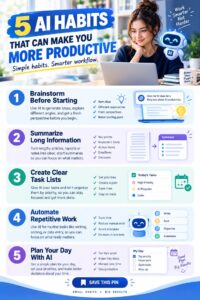
Productivity is an important part of professional success. Employees, freelancers, entrepreneurs, and managers are constantly looking for ways to complete important tasks more efficiently without sacrificing quality.
Artificial intelligence is becoming a useful tool for improving workplace productivity. AI can help professionals organize information, automate repetitive tasks, generate ideas, summarize documents, analyze data, and support everyday decision-making.
However, productivity is not simply about doing more work. It is also about spending time on the tasks that matter most. When used responsibly, AI can reduce unnecessary work and give professionals more time to focus on activities that require human judgment, creativity, communication, and expertise.
1. Automate Repetitive Tasks
Many jobs involve repetitive activities that take time but do not necessarily require complex decision-making.
Depending on the workplace and available tools, AI can assist with tasks such as organizing information, sorting documents, summarizing messages, creating routine reports, or processing certain types of data.
For example, an employee who regularly prepares the same type of report could use AI-assisted automation to organize information into a consistent format.
Reducing repetitive work can allow employees to spend more time on higher-priority responsibilities.
2. Summarize Long Documents
Professionals often need to read reports, meeting notes, research papers, emails, and other documents.
AI can help summarize lengthy material and identify major themes, key points, or action items.
For example, after a long meeting, an AI tool may help organize notes into a summary containing important decisions and follow-up tasks.
However, summaries should be checked against the original information when accuracy is important.
3. Write Routine Communications
Writing emails and other workplace messages can take up a significant amount of time.
AI can help create first drafts of routine communications, allowing employees to focus on the important information they need to communicate.
For example, AI could help draft a meeting reminder, project update, customer response, or internal announcement.
The employee should review and edit the final message to ensure that it is accurate, appropriate, and consistent with the intended tone.
4. Generate Ideas Faster
Sometimes the biggest productivity challenge is not completing a task but figuring out where to start.
AI can act as a brainstorming assistant.
Professionals can use it to generate ideas for marketing campaigns, presentations, project plans, articles, product concepts, or solutions to workplace challenges.
The human user should evaluate the ideas and select those that are realistic and useful.
AI can provide possibilities, but professional judgment remains essential.
5. Organize Your Workday
AI can help professionals organize tasks and priorities.
You can provide a list of responsibilities and ask an AI tool to organize them according to urgency, importance, deadlines, or estimated effort.
For example, a worker with several deadlines could use AI to create a daily or weekly task structure.
This can make a large workload easier to manage.
However, your actual priorities should always be based on workplace requirements and discussions with your manager or team.
6. Improve Meeting Productivity
Meetings can consume a considerable amount of working time.
AI-assisted meeting tools can help with activities such as transcription, summarization, and identifying action items, depending on the software being used.
Instead of manually writing every detail, employees may be able to focus more closely on the discussion.
Before using AI recording or transcription features, make sure you follow your organization’s policies and obtain any required consent.
7. Analyze Data
Many professionals work with data, even if they are not data scientists.
AI can help organize information, identify patterns, summarize datasets, and support certain types of analysis.
For example, a sales professional could use AI-assisted analysis to examine sales information and identify changes in customer behavior.
AI-generated analysis should still be reviewed carefully, particularly when decisions involve important financial, legal, operational, or customer matters.
8. Improve Research
Research can involve searching through large amounts of information.
AI can help professionals organize research questions, summarize material, identify themes, and create outlines.
For example, a marketing employee researching a new customer segment could use AI to organize initial questions and research categories.
Important facts should be checked against reliable sources because AI systems can sometimes provide incorrect or outdated information.
9. Create Presentations
Preparing presentations can take time.
AI tools can assist with brainstorming presentation structures, organizing information, developing talking points, and creating initial slide content.
For example, an employee preparing a business presentation could use AI to turn a collection of notes into a logical outline.
The employee should still review the content and make sure the presentation reflects the organization’s goals and accurate information.
10. Improve Customer Service
AI can help customer-service teams handle common questions and organize information.
AI-powered systems may provide customers with answers to frequently asked questions or help employees find relevant information more quickly.
This can reduce the amount of time employees spend searching for basic information.
However, complex, sensitive, or unusual customer issues may require human support.
11. Support Project Management
AI can help project teams organize tasks, identify deadlines, summarize project information, and track progress.
For example, an AI-assisted system might help transform meeting notes into a list of potential action items.
Project managers can then review the list, assign responsibilities, and confirm deadlines.
AI can support organization, but people still need to manage communication, priorities, risks, and decisions.
12. Reduce Information Overload
Modern professionals often deal with large numbers of emails, documents, notifications, and messages.
AI can help summarize information and organize it into categories.
For example, employees may use AI to identify the most important points from a large collection of documents.
This can help reduce the time spent searching for information.
However, important messages should not be ignored simply because an AI system considers them less important.
13. Improve Learning at Work
AI can also help employees learn new skills more efficiently.
Professionals can use AI to explain unfamiliar concepts, create practice exercises, provide examples, and help them understand technical information.
For example, someone learning a new software platform could use AI to ask questions about specific features.
This can support continuous professional development.
14. Focus on High-Value Work
The biggest productivity benefit of AI may come from giving people more time for work that machines cannot easily replace.
Instead of spending hours on repetitive administrative tasks, employees may be able to spend more time on strategy, creativity, relationship-building, problem-solving, and decision-making.
This is where human expertise becomes particularly important.
15. Use AI Responsibly
AI productivity tools should be used carefully.
Do not automatically trust every AI-generated answer. Review important information and correct errors before using it.
You should also follow workplace rules regarding confidential information, customer data, intellectual property, and approved software.
Never upload sensitive company or personal information into an AI system unless you are authorized to do so and understand how the information will be handled.
16. Measure Whether AI Is Actually Helping
Using AI does not automatically make a person more productive.
A useful approach is to measure the results.
Ask yourself:
- Did the task take less time?
- Did the quality improve?
- Did AI reduce repetitive work?
- Did it create additional errors?
- Did it allow me to focus on more important responsibilities?
If an AI tool saves time but creates significant mistakes that require additional work, it may not actually improve productivity.
The goal should be better results, not simply greater use of technology.
Final Thoughts
AI can make professionals more productive by helping with repetitive tasks, research, writing, data analysis, meetings, organization, brainstorming, customer service, and learning.
However, AI is most useful when it supports human expertise rather than replacing it.
The best approach is to identify tasks where AI can safely save time, test the technology, review its results, and measure whether it genuinely improves your workflow.
When combined with strong communication, critical thinking, creativity, and professional knowledge, AI can become a powerful productivity assistant that helps you spend more time on the work that matters most.