
What AI Skills Are Useful for Non-Technical Jobs?
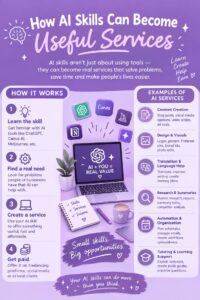
Artificial intelligence is becoming part of everyday work across many industries. While AI is often associated with programming, machine learning, and advanced mathematics, many AI skills are also useful for people working in non-technical careers.
Marketing professionals, teachers, writers, human resources specialists, sales professionals, customer service workers, administrative employees, managers, and entrepreneurs can all benefit from understanding how to use AI effectively.
The goal is not necessarily to become an AI engineer. Instead, non-technical professionals can learn practical AI skills that help them save time, organize information, improve communication, automate repetitive tasks, and make better use of workplace technology.
1. AI Literacy
AI literacy is one of the most useful skills for non-technical workers.
It means understanding the basics of artificial intelligence, including what AI can do, how AI tools are used, and what their limitations are.
You do not need to understand complex algorithms or programming languages.
Instead, learn to recognize common AI applications and understand when using AI may be appropriate.
Basic AI knowledge can help you communicate more effectively with colleagues and make informed decisions about technology.
2. Prompt Writing
Prompt writing is useful for communicating effectively with generative AI tools.
A good prompt gives the AI clear instructions about what you want.
For example, instead of asking an AI tool to “write an email,” you can explain the purpose of the email, the audience, the desired tone, the key information, and the preferred length.
This can help produce more useful results.
Prompting can be applied to many non-technical jobs, including marketing, administration, education, sales, customer service, and human resources.
3. AI-Assisted Writing
AI can help professionals with many writing tasks.
Employees may use AI to brainstorm ideas, create outlines, improve wording, summarize information, or prepare first drafts.
For example, an administrative worker might use AI to create a draft of a routine announcement.
A marketing professional might use it to brainstorm campaign ideas.
A manager might use it to organize notes into a structured report.
However, employees should review and edit AI-generated material before using it professionally.
4. AI Research Skills
AI can help professionals explore topics and organize information quickly.
Non-technical workers can use AI to brainstorm research questions, summarize documents, compare ideas, or identify areas that require further investigation.
However, AI-generated information should not automatically be treated as accurate.
Important facts should be checked against reliable sources, especially when the information could affect customers, finances, legal matters, health, or business decisions.
5. Data Literacy
You do not need to become a data scientist to understand data.
Basic data literacy can help non-technical workers interpret charts, reports, percentages, trends, and business metrics.
AI tools can assist with analyzing information, but employees still need to understand what the data means.
Useful skills include spreadsheets, basic statistics, data visualization, and interpreting business reports.
6. AI-Powered Productivity
AI can help employees organize their work.
Depending on the tools available, professionals may use AI to summarize meetings, create task lists, organize notes, draft routine documents, and prioritize information.
For example, an employee could use an approved AI tool to turn meeting notes into a list of action items.
This can reduce time spent on administrative activities.
7. Workflow Automation
Automation is particularly useful for repetitive workplace tasks.
Non-technical employees can learn to identify tasks that follow predictable steps and determine whether they can be automated.
For example, a business might automatically organize incoming information, update a spreadsheet, send notifications, or create routine reports.
Many modern automation platforms provide visual tools that do not require advanced programming.
8. AI-Assisted Marketing
Marketing professionals can use AI for content ideas, audience research, campaign planning, analytics, and personalization.
AI can help marketers process large amounts of information and generate initial ideas.
However, marketing knowledge remains important.
Professionals still need to understand customers, branding, communication, business goals, and market conditions.
AI works best as a support tool rather than a replacement for marketing strategy.
9. AI for Customer Service
Customer service professionals can learn how AI-powered support systems work.
AI chatbots can answer common questions, provide information, and direct customers to appropriate resources.
Human representatives can focus on complicated cases that require judgment, empathy, negotiation, or specialized knowledge.
Customer service workers who understand both AI tools and human communication can contribute to effective customer experiences.
10. AI for Human Resources
HR professionals can use AI-supported tools for administrative activities, communication, workforce analysis, scheduling, and other processes.
However, employment decisions require careful consideration of fairness, privacy, accuracy, and organizational policies.
HR professionals should understand the limitations of AI and maintain appropriate human oversight.
11. AI for Sales
Sales professionals can use AI to organize customer information, research prospects, draft communications, summarize interactions, and analyze sales data.
AI may help sales teams save time on administrative activities.
However, successful sales work still depends heavily on understanding customers, building relationships, communication, negotiation, and trust.
12. AI for Project Management
Project managers can use AI to organize tasks, summarize project updates, identify deadlines, and prepare reports.
AI can help project managers handle large amounts of information.
However, project managers still need to coordinate people, manage expectations, resolve problems, and make decisions.
Understanding how AI can support project management can improve workflow efficiency without replacing leadership responsibilities.
13. Critical Thinking
Critical thinking may be one of the most important AI-related skills for non-technical workers.
AI systems can produce information that sounds convincing but may be inaccurate.
Professionals should ask:
- Is this information correct?
- What evidence supports it?
- Can I verify it?
- What information is missing?
- Could there be another interpretation?
Learning to evaluate AI outputs can help prevent mistakes.
14. Communication Skills
AI skills should be combined with strong communication.
Non-technical professionals may need to explain AI-generated information to colleagues or customers.
They may also need to communicate with technical teams about how AI should be used in their department.
Clear writing, presentations, listening, teamwork, and interpersonal communication remain valuable.
15. AI Ethics and Responsible Use
Non-technical workers should understand basic responsible AI practices.
Important topics include privacy, confidential information, bias, misinformation, security, intellectual property, and human oversight.
Employees should follow workplace policies and avoid entering sensitive company or customer information into AI tools unless the organization has specifically authorized that use.
16. Problem-Solving
AI tools are most useful when they solve real problems.
Non-technical professionals should learn to identify inefficient processes and consider whether AI could help.
For example, if an employee spends hours organizing repetitive information every week, they could investigate whether an AI or automation tool can reduce that workload.
The important skill is not simply knowing a tool. It is knowing when a tool can solve a meaningful problem.
17. Continuous Learning
AI technology changes quickly.
Non-technical professionals should develop a habit of learning and experimenting with relevant tools.
You do not need to learn every new AI application.
Instead, focus on tools and skills that relate directly to your job or career goals.
Online courses, workplace training, tutorials, professional communities, and practical projects can all support continuous learning.
How Can You Start Learning AI Without Technical Skills?
You can begin with simple steps.
First, learn basic AI concepts.
Next, choose one or two AI tools that are relevant to your work.
Practice using them for low-risk tasks such as brainstorming, drafting, organizing information, or summarizing non-sensitive material.
Then learn how to evaluate the results.
Once you are comfortable, explore automation, data analysis, or other AI applications relevant to your profession.
You do not need to learn everything at once.
Final Thoughts
AI skills are not limited to programmers and technology professionals.
Non-technical workers can benefit from learning AI literacy, prompt writing, AI-assisted research, productivity tools, workflow automation, data literacy, critical thinking, and responsible AI use.
The most valuable approach is to combine AI with your existing professional expertise.
A marketer can become more effective by combining marketing knowledge with AI skills. A teacher can combine education expertise with AI-assisted learning tools. A manager can combine leadership skills with AI-supported productivity and analysis.
As workplaces continue to adopt artificial intelligence, professionals who understand how to use these tools responsibly while maintaining strong human skills can be better prepared for changing career requirements.