
How Can AI Help You Write a Cover Letter?
A cover letter is an important part of many job applications. While a resume summarizes your education, experience, and skills, a cover letter gives you an opportunity to explain why you are interested in a particular position and how your background relates to the employer’s needs.
Writing a strong cover letter can be difficult, especially when applying for several jobs. Artificial intelligence can make the process easier by helping you organize your ideas, improve your writing, customize your message, and identify relevant information from a job description.
However, AI should not write a cover letter that misrepresents your experience. The best approach is to use AI as a writing assistant while keeping the content accurate, personal, and relevant to the position.
1. Start With Your Real Experience
Before asking AI to write a cover letter, gather information about yourself.
Consider your education, previous jobs, internships, projects, skills, achievements, and career goals.
You should also identify why you are interested in the specific position.
Providing this information to an AI tool can help it create a more relevant draft. Without enough personal information, AI may produce a generic letter that could sound similar to hundreds of other applications.
Your actual experience should always be the foundation of the letter.
2. Analyze the Job Description
Job descriptions can contain a lot of information.
AI can help you break a job description into important categories, such as responsibilities, required skills, preferred qualifications, and company expectations.
For example, a marketing position might emphasize content creation, communication, social media, customer research, and data analysis.
AI can help you identify these themes so you can decide which parts of your experience are most relevant.
This makes it easier to write a cover letter that is focused on the specific position rather than a generic introduction.
3. Create a First Draft
Starting a cover letter from a blank page can be challenging.
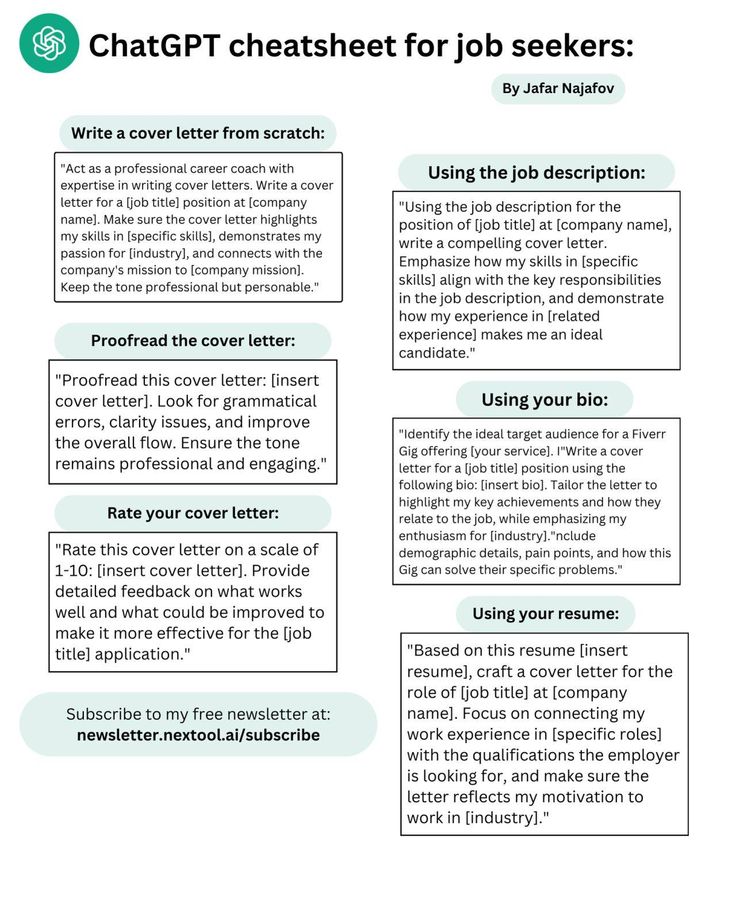
AI can help create a first draft based on information you provide.
You can give it your actual experience, the job description, and your reasons for applying. The tool can then help organize those details into a logical structure.
The draft should be treated as a starting point. Read it carefully and rewrite sections that do not sound like you.
4. Personalize the Introduction
The opening paragraph should explain why you are interested in the position.
AI can provide several ways to structure an introduction, but you should choose wording that reflects your genuine interest.
For example, if you are applying for a technology position because you have developed personal software projects, you can explain that connection.
A specific reason for applying is generally more meaningful than a generic statement about wanting to work for a company.
5. Connect Your Skills to the Position
A strong cover letter should explain how your skills relate to the employer’s needs.
AI can help you identify connections between your experience and the requirements listed in the job description.
Suppose a position requires project management experience. If you have actually managed a school, workplace, volunteer, or freelance project, AI can help you explain how that experience relates to the position.
The important point is to make genuine connections rather than adding skills you do not have.
6. Highlight Relevant Achievements
AI can also help you identify achievements that deserve attention.
Instead of simply listing responsibilities, consider what you accomplished.
For example, perhaps you improved a process, completed a project, helped customers, increased engagement, reduced errors, or successfully managed a difficult task.
Give AI the real details, and it can help you describe the achievement clearly.
Do not allow AI to invent numbers or results.
7. Improve Your Writing
AI can review your draft for grammar, spelling, sentence structure, and clarity.
It can also identify sentences that are too long or repetitive.
This can be particularly useful if you know what you want to say but have difficulty expressing it professionally.
However, avoid making the letter unnecessarily complicated. Clear and natural language is often more effective than excessive formal wording.
8. Adjust the Tone
Different companies and industries may have different communication styles.
A traditional financial organization may expect a more formal tone, while a creative company may accept a more conversational style.
AI can help you adjust the tone while keeping the information accurate.
You can ask it to make a draft more professional, concise, confident, or conversational.
Even after making these changes, make sure the final version still sounds natural to you.
9. Keep the Cover Letter Concise
A cover letter should communicate useful information without becoming unnecessarily long.
AI can help identify repeated ideas and remove unnecessary sentences.
You can ask AI to shorten sections while preserving the important information.
A concise letter can make it easier for the reader to understand your main qualifications and motivation.
10. Show Your Interest in the Company
A good cover letter should demonstrate that you have some understanding of the organization and the role.
AI can help you organize information you already know about the company, but you should independently verify important facts.
Avoid including generic statements that could apply to any employer.
Instead, explain why the position, industry, product, service, mission, or type of work genuinely interests you.
11. Create Different Versions
If you are applying for multiple positions, writing every cover letter from scratch can take a lot of time.
AI can help you create different versions based on the requirements of each position.
Start with your core information and then customize the relevant sections.
For example, you may emphasize communication skills for one position and technical skills for another.
Every version should remain truthful and specific to the position.
12. Prepare for Different Career Stages
Your cover letter should reflect your career stage.
A recent graduate may focus on education, internships, projects, volunteer work, and transferable skills.
An experienced professional may focus more heavily on career achievements, leadership, specialized knowledge, and relevant professional experience.
AI can help you determine which aspects of your background deserve greater attention.
13. Avoid Generic AI Language
One of the biggest risks of using AI for cover letters is producing text that sounds generic.
Phrases that are overly formal or vague can make the letter feel impersonal.
Instead of accepting the first draft, replace generic statements with specific examples from your experience.
Your goal should be to make the letter sound like a professional version of your own voice.
14. Check Everything Before Sending
AI-generated content can sometimes contain mistakes.
Before submitting your cover letter, check:
- Your name and contact information
- The employer’s name
- The position title
- Your qualifications
- Your work history
- Your achievements
- Company information
- Grammar and spelling
Make sure you have not accidentally left information from another application in the document.
15. Never Invent Qualifications
AI should never be used to create qualifications that you do not have.
Do not claim to have a degree, certification, skill, job title, or achievement simply because AI suggests that it would strengthen your application.
Employers may verify information during the hiring process.
An honest cover letter gives you a stronger foundation for interviews and future employment.
Example of a Useful AI Workflow
A simple process for using AI to create a cover letter could look like this:
Step 1: Gather your resume and the job description.
Step 2: Identify your genuine skills and relevant experience.
Step 3: Ask AI to identify the most relevant connections between your experience and the job requirements.
Step 4: Use those points to create a first draft.
Step 5: Review and personalize the draft.
Step 6: Ask AI to check grammar and clarity.
Step 7: Verify every fact.
Step 8: Submit the final version only after making sure it accurately represents you.